# Clinical Copilot
{% hint style="info" %}
The clinical copilot is a real-time documentation channel - not a voice agent. It silently observes a medical encounter and produces structured clinical output through tool calls, without generating conversational text.
{% endhint %}
A provider sits with a patient. As they talk, the platform listens to the encounter in real time, generates structured SOAP notes, suggests ICD-10 codes, and flags clinical alerts - drug interactions, allergy concerns, vital sign anomalies. When the encounter ends, a finalized clinical snapshot is ready for review. The provider spends seconds reviewing instead of minutes typing.
The clinical copilot is a distinct channel alongside phone and text. Where phone and text handle remote patient interactions, the clinical copilot handles in-person encounters where a provider and patient are in the same room. The documentation is a side effect of the intelligence - the primary value is clinical reasoning in real time, not note-taking.
## Three Phases
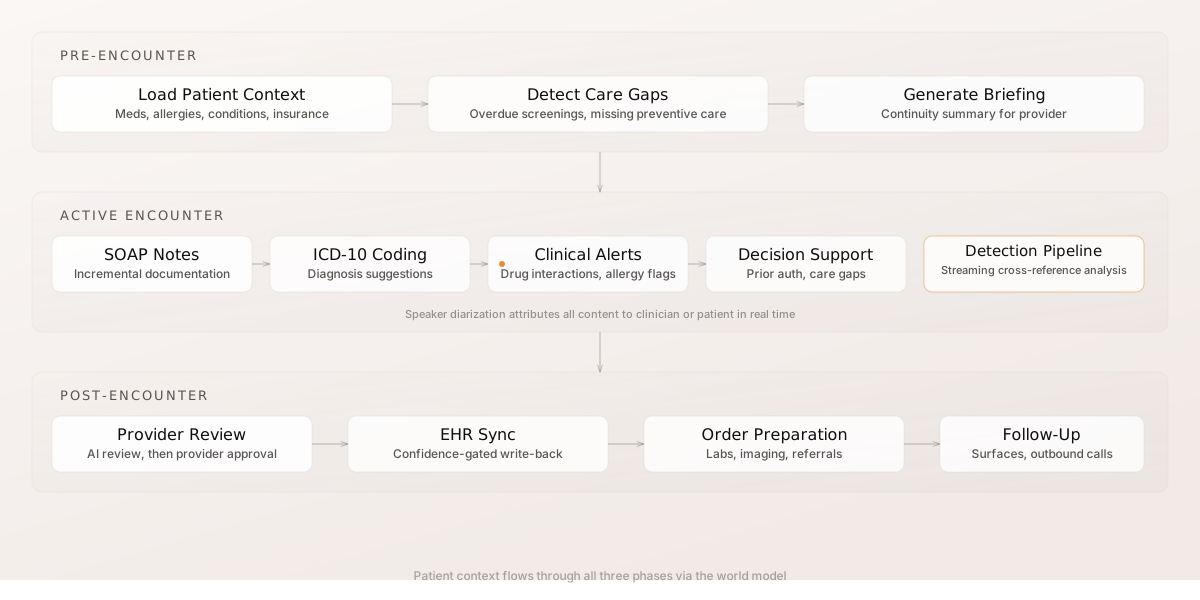
Clinical documentation operates across three temporal phases, each exercising different layers of the platform.
### Pre-Encounter: Patient Context Loading
Before the provider begins, the platform loads the patient's full context from the [world model](https://docs.amigo.ai/data/world-model): demographics, current medications, allergies, active conditions, recent lab results, insurance details, and encounter history. It then generates a pre-encounter briefing:
* **Care gap identification** - Overdue screenings, lapsed vaccinations, missing preventive care across clinical categories (respiratory, mental health, polypharmacy, continuity of care)
* **Existing drug interactions** - Flags in the current medication list before the encounter starts
* **Insurance context** - Coverage constraints and prior authorization requirements
* **Continuity summary** - Key findings from previous encounters ("last visit: adjusted metformin dose, ordered A1C recheck")
* **Upcoming appointments** - Scheduled visits and follow-ups, so the provider can coordinate care across upcoming touchpoints
* **Recent call outcomes** - Summaries from prior voice interactions, capturing what was discussed and resolved without the provider needing to search call logs
* **Data quality context** - Confidence assessment of the patient's record, highlighting fields with low data quality or single-source information that may need verification during the encounter
The provider walks in already knowing what matters. No chart review. No "let me pull up your records."
### Active Encounter: Real-Time Documentation and Alerts
During the encounter, the platform transcribes the conversation in real time, extracts clinical content, and runs safety checks concurrently:
* **SOAP notes** update incrementally as the conversation progresses
* **ICD-10 codes** are suggested as diagnoses emerge in the discussion
* **Safety alerts** (drug-allergy conflicts, drug-drug interactions) surface immediately when medications are mentioned - they do not wait for the full transcript
* **Care gaps** are surfaced while the patient is present - the best time to address overdue screenings or missing preventive care
* **Clinical entities** (medications, symptoms, diagnoses, vitals) are extracted and cross-referenced against the patient's existing record
The platform automatically identifies speakers during the encounter. Parallel audio analysis distinguishes clinician speech from patient speech in real time, so transcript segments and extracted clinical entities are attributed to the correct speaker without manual tagging. When the patient's identity is known, their preferred language from the [world model](https://docs.amigo.ai/data/world-model) is used to optimize speech recognition accuracy.
#### Clinical Detection Pipeline
Beyond per-utterance extraction, a streaming detection pipeline watches encounter events as they arrive and cross-references them against the patient's full clinical context. The pipeline joins newly mentioned medications against the patient's allergy list, checks for drug-drug interactions across the entire medication set, evaluates ICD-10 coding completeness against the accumulated assessment, and surfaces care gaps relevant to the current encounter.
Detection results write back as analysis events, which can trigger deeper analysis rules - a newly discovered drug interaction might surface a dosage concern, which triggers a prior authorization check. The pipeline converges when no new patterns match, bounded to prevent infinite recursion. The copilot surfaces findings to the provider as they are produced, without waiting for a manual refresh.
The detection pipeline also evaluates standardized quality measures (such as HEDIS indicators) against the encounter in progress - flagging when a diabetic patient has no A1C documented or a hypertensive patient has no blood pressure reading, so the provider can address gaps while the patient is still present.
### Post-Encounter: Automation
After the provider ends the encounter:
* **Note polishing** - The accumulated SOAP sections are rewritten as coherent medical prose, not raw transcript fragments. The system learns each provider's documentation style over time and adapts the polished output to match their preferences
* **Final coding** - ICD-10 codes are verified for completeness against the full assessment
* **Order preparation** - Lab orders, imaging requests, and referrals extracted from the Plan section are structured for one-click approval
* **Follow-up automation** - Patient education materials matched to diagnoses, follow-up [surfaces](https://docs.amigo.ai/channels/surfaces) (such as between-visit check-ins) queued, outbound calls scheduled through the [outbound system](https://docs.amigo.ai/channels/outbound)
* **Encounter quality score** - A weighted documentation completeness score (SOAP sections, coding, safety review, note polish, orders, entity extraction) tells the provider whether the encounter is ready for finalization or needs attention before approval
## Encounter Entity
Each clinical encounter creates an encounter entity in the [world model](https://docs.amigo.ai/data/world-model), capturing all clinical intelligence from the session:
* **SOAP notes** - Subjective, Objective, Assessment, and Plan sections
* **ICD-10 codes** - Suggested, approved, and rejected codes with evidence chains
* **Clinical alerts** - Drug interactions, allergy conflicts, care gaps, and safety flags
* **Clinical entities** - Medications, symptoms, diagnoses, vitals, and procedures extracted from the conversation
* **Encounter metadata** - Provider, patient, timestamps, duration, and lifecycle state
The encounter entity follows the same event-sourced pattern as other world model entities. The encounter state is durable - it survives browser refreshes and connection interrupts.
## Clinical Decision Support
Beyond documentation, the platform provides active clinical decision support during the encounter:
| Capability | What It Does |
| -------------------------------- | ------------------------------------------------------------------------------------------------------------------------------------------------------------------------------------------------------------------- |
| **Drug-allergy detection** | Cross-references mentioned medications against the patient's allergy list, including cross-class sensitivity (e.g., penicillin allergy flagged when amoxicillin is discussed) |
| **Drug-drug interaction** | Checks new prescriptions against the entire current medication list for specific interaction mechanisms (serotonin syndrome, QT prolongation, renal dosing adjustments) |
| **Care gap surfacing** | Identifies overdue screenings, labs, and preventive care while the patient is present |
| **Prior authorization flagging** | Detects procedures and medications that require prior authorization - advanced imaging (MRI, CT, PET) and specialty referrals are flagged automatically |
| **Clinical guideline matching** | Evaluates the encounter against evidence-based practice guidelines (ADA statin therapy for diabetics, USPSTF depression screening, JNC lifestyle counseling for hypertension) and surfaces relevant recommendations |
| **Clinical entity conflicts** | Alerts when the conversation contradicts the medical record (patient says "no allergies" but the record shows a penicillin allergy) or when patient-reported medications differ from the EHR active list |
| **Crisis detection** | Monitors for mental health crisis indicators, dangerous vital sign ranges, and medication safety concerns |
These capabilities depend on patient context depth. The richer the world model data (medications, allergies, conditions, insurance), the more the platform can catch.
## Encounter Review
{% @mermaid/diagram content="flowchart LR
L\[Live Encounter] --> F\[Finalization]
F --> AI\[AI Review]
AI --> P\[Provider Review]
P -->|Approved| C\[Confidence Gates]
P -->|Corrections| AI
C --> E\[EHR Sync]" %}
Finalized encounters enter a multi-stage review workflow before clinical data flows to the EHR:
1. **AI review** - The platform's review pipeline checks the encounter for completeness, internal consistency, and coding accuracy
2. **Provider review** - The provider reviews the generated documentation through a dedicated interface, making corrections or approvals
3. **Confidence gating** - Approved encounter data passes through the same [confidence gates](https://docs.amigo.ai/data/connectors-and-ehr) as all other world model data before reaching the EHR
Review catches errors that real-time generation misses. A provider who said "rule out pneumonia" should not have pneumonia coded as a confirmed diagnosis. The review stage lets the provider correct the assessment before it reaches the medical record.
## Outbound Integration
Encounters trigger downstream workflows through the platform's outbound system - both during the visit and after finalization:
* **Follow-up calls** - An encounter that identifies a needed follow-up can automatically schedule an outbound call through the [outbound system](https://docs.amigo.ai/channels/outbound)
* **Surface delivery** - Missing information identified during the encounter (e.g., updated insurance, consent forms) can generate [surfaces](https://docs.amigo.ai/channels/surfaces) delivered to the patient via SMS. Surfaces can be triggered mid-encounter while the patient is still present - not just after the visit ends - so the provider can address data gaps in real time
* **EHR write-back** - Reviewed encounter data syncs to the EHR through the [connector runner](https://docs.amigo.ai/data/connectors-and-ehr)
A provider encounter is not an isolated event - it feeds into the same data pipeline and outbound workflows as voice calls and text sessions.
## Provider Interface
The documentation interface is a standalone web application with three views matching the encounter lifecycle:
**Pre-encounter briefing:**
* **Patient summary** - Demographics, active conditions, current medications, allergies, and insurance loaded from the [world model](https://docs.amigo.ai/data/world-model)
* **Care gaps and alerts** - Overdue screenings, drug interactions, and clinical concerns identified before the encounter starts
* **Recent history** - Prior encounters, call outcomes, and upcoming appointments
**During the encounter:**
* **Safety monitor** - Full-width banner at the top displaying active safety concerns (drug-allergy flags, drug interactions, crisis indicators) as they are detected
* **Transcript panel** - Speaker-attributed real-time transcription from audio
* **Living document** - SOAP sections that update incrementally as the conversation progresses
* **Clinical summary** - Problem-oriented view of extracted clinical entities, ICD-10 codes, and detection pipeline findings grouped by clinical category
* **Recording controls** - Start, pause, and resume the audio stream
**Post-encounter review:**
* **Polished note** - Editable clinical prose generated from the accumulated SOAP sections
* **Coding and orders** - ICD-10 codes with batch approve/reject, prepared lab and imaging orders, referral drafts
* **Session statistics** - Encounter duration, entity counts, alert summary
* **One-click approval** - Approve the finalized encounter to promote confidence and trigger EHR sync
The interface is designed for a secondary screen or tablet during the encounter. Providers can glance at the documentation in progress without interrupting the patient interaction.
### Clinician Access Management
Access to clinical documentation is managed through workspace settings in the Developer Console. Workspace administrators configure which clinicians are authorized to use the documentation system. The scribe is provisioned as a built-in workspace service that cannot be accidentally deleted.
Workspaces can optionally enable voice authentication for clinicians. When enabled, clinicians enroll a voice passphrase and verify their identity by speaking it on subsequent logins. The identity service compares the spoken passphrase against the enrolled voiceprint using the same [speaker verification](https://docs.amigo.ai/voice/emotion-detection#speaker-verification) infrastructure used for patient identity during calls, and upgrades the session token with a biometric verification claim. Voice authentication is feature-gated per workspace and always skippable - it adds a biometric factor without blocking access.
## When to Use Clinical Documentation
| Scenario | How Clinical Documentation Helps |
| --------------------------------- | ------------------------------------------------------------------------------------------------------------------------------------------------------------------- |
| **Primary care visits** | Generate SOAP notes and coding in real time, reducing post-visit documentation from 15+ minutes to a quick review. Care gaps surfaced while the patient is present. |
| **Specialist consultations** | Capture detailed clinical discussions with domain-specific terminology and accurate specialty coding. Drug interaction checking against the full medication list. |
| **Follow-up visits** | Pre-encounter briefing with continuity summary from prior encounters. Documentation starts with full patient context. |
| **Complex medication management** | Real-time drug-allergy and drug-drug interaction detection as prescriptions are discussed. Prior authorization flagging for medications that require it. |
## Relationship to Other Capabilities
Clinical documentation integrates with the platform's existing systems:
* [**World Model**](https://docs.amigo.ai/data/world-model) - Encounter entities are first-class world model entities, queryable by agents in future voice calls and text sessions
* [**Functional Memory**](https://docs.amigo.ai/agent/memory) - Facts extracted from encounters feed into the patient's memory dimensions, informing future interactions
* [**Clinical Tools**](https://docs.amigo.ai/agent/clinical-tools) - Encounters use the same patient lookup, medication, and scheduling tools available during voice calls
* [**Analytics**](https://docs.amigo.ai/intelligence-and-analytics/intelligence) - Encounter metrics (documentation quality, coding accuracy, alert rates) flow into the same analytics pipeline as call intelligence
{% hint style="info" %}
Clinical documentation operates on the same platform infrastructure as voice and text. Agent configurations, safety rules, and compliance frameworks apply uniformly across all channels.
{% endhint %}
---
# Agent Instructions: Querying This Documentation
If you need additional information that is not directly available in this page, you can query the documentation dynamically by asking a question.
Perform an HTTP GET request on the current page URL with the `ask` query parameter:
```
GET https://docs.amigo.ai/channels/clinical-copilot.md?ask=
```
The question should be specific, self-contained, and written in natural language.
The response will contain a direct answer to the question and relevant excerpts and sources from the documentation.
Use this mechanism when the answer is not explicitly present in the current page, you need clarification or additional context, or you want to retrieve related documentation sections.